


MOS Excel Associate & Expert Exam Prep+ Lessons & Timed Mock Exams
One payment. Yours for life.
Why choose us?
- Instant access after checkout
- Works in your browser, no Excel needed
- Every MO-210 and MO-211 skill taught
- Timed mock exams like the real one
- Instant feedback on every step
- 7-day money-back guarantee
Couldn't load pickup availability

MOS Excel Associate & Expert Exam Prep
€63,95
€91,95


How every lesson works
One idea per lesson, done by you in a sheet that works like Excel, with instant feedback.
- 1
Learn the idea
A short explanation with real business data. Press play to listen, or read it.
- 2
Do it in the sheet
Type formulas, sort, filter and build PivotTables and charts yourself.
- 3
See your exact mistake
The check reads what you did and names the cell to fix. Hints are there when you need them.
From your first cell to exam day
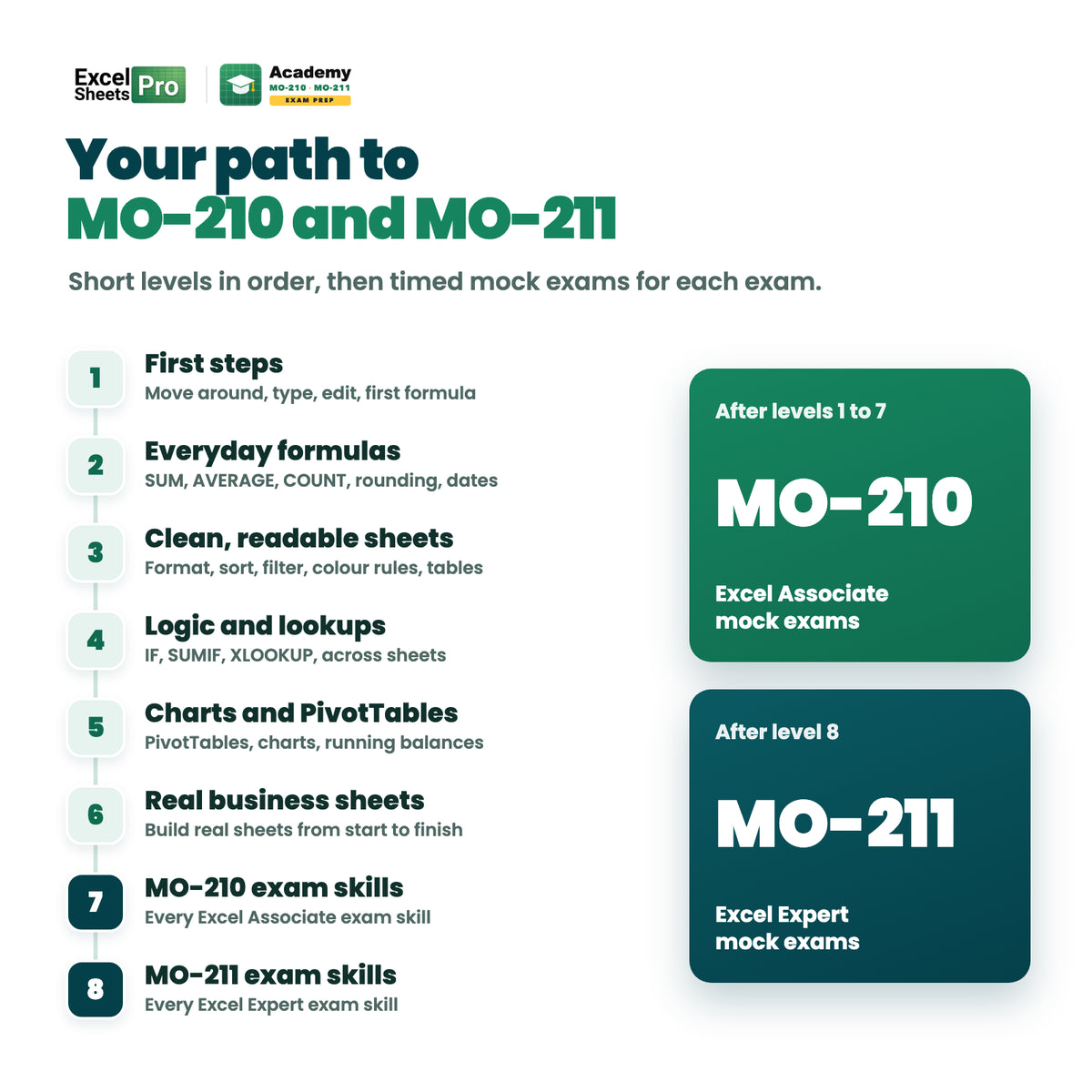
Levels 1 to 6 build everyday business skills with sales, budgets and invoices. Levels 7 and 8 prepare you for the exams.
First steps
Move around, type, edit and write your first formula.
Everyday formulas
SUM, AVERAGE, COUNT, percentages, rounding and dates.
Clean, readable sheets
Format, sort, filter, colour rules, drop-downs and tables.
Logic and lookups
IF, SUMIF, XLOOKUP and formulas across sheets.
Analyse and show
PivotTables, charts, dates and running balances.
Real work
Build real business sheets from start to finish.
MO-210 Excel Associate exam skills
Levels 1 to 7 prepare you for MO-210. Then take the MO-210 mock exams.
- Manage worksheets and workbooks
- Manage data cells and ranges
- Manage tables and table data
- Formulas and functions
- Manage charts
MO-211 Excel Expert exam skills
Builds on MO-210 to prepare you for MO-211. Then take the MO-211 mock exams.
- Workbook options and settings
- Manage and format data
- Advanced formulas and macros
- Advanced charts and tables
Every skill in Microsoft’s published MO-210 and MO-211 outlines has a lesson that teaches it.
Exam practice that feels like exam day
Timed mock exams for MO-210 and MO-211 in an exam window like the real one: the workbook on top, the tasks underneath, one timer. No Excel needed, nothing to download.
- The exam’s formatProjects with short tasks and one 50-minute timer. Flag tasks to come back to and see an overview before you finish.
- A score out of 1000, like the real examSplit by exam topic. You pass the real exam at 700. Our score is an estimate from your task results.
- A “What to study” list after each examEvery task to review links to the lesson that teaches it.
- Try a mock exam freeA free 10-minute MO-210 mock exam, graded like the full mock exams.

Exam-style practice workbooks, checked in the page
Charts, page setup, macros, data import and more, practised in our Excel window the way the exam runs them. No Excel needed.
Any valid method counts. The check reads the result in your workbook, so you can use the route you know.

- 1
Open the practice workbook
A real workbook with business data opens in the page, ready for the tasks.
- 2
Do the tasks in the workbook
Same ribbon and dialogs as Excel for Microsoft 365 on Windows, the version the exam uses.
- 3
Check and see what to fix
Press Check my work: each check that passed and each one to fix is named.
Who it is for
Complete beginners
Level 1 starts at your very first click, with real business data and instant feedback.
Start at Level 1Job seekers
Practise what job ads ask for: formulas, XLOOKUP, PivotTables and charts.
Focus on Levels 4 and 5Exam candidates
Timed MO-210 and MO-211 mock exams in the real exam format, with a score out of 1000.
Levels 7 and 8Questions
Anything else? Ask us from the Help page and we reply by email.
Do I need Excel to start?
No. Every lesson, practice workbook and mock exam runs in your web browser, in a window that works like Excel for Microsoft 365 on Windows, the version the exam uses. Nothing to install, nothing to download.
Can I learn on my phone?
Yes, the lessons work by touch on a phone. Practice workbooks and mock exams need a bigger screen, so you do those on a computer.
Mac or Windows?
Both. Everything runs in the browser, so a Mac or a Windows computer works. The Excel window copies Excel for Windows, the version the MO-210 and MO-211 exams run on.
How are the mock exams scored?
Each mock exam runs in the exam window with one 50-minute timer and is graded when you press Finish. You get a score out of 1000, like the real exam, split by exam topic, and a “What to study” list with a link to each lesson. You pass the real exam at 700. Our score is an estimate from your task results.
When am I ready to book the exam?
When you score 800 or more the first time you take 2 different mock exams for that exam. You book the real exam with Certiport, Microsoft's exam provider.
How do I get access?
Right after checkout. Go to library.excelsheetspro.com/academy and sign in with the email and order number from your purchase.
Can I get a refund?
Yes, within 7 days of purchase. Your academy access closes when the refund is made.
Who makes this course?
Excel Sheets Pro, the team behind our template library. The MOS Excel Associate & Expert Exam Prep (MO-210 · MO-211) is an independent course built from the skills Microsoft publishes for the MO-210 and MO-211 exams. The course is in English.
Start with Level 1 today
Level 1 is free in your browser. When you are ready, choose a plan and carry on with Level 2.
Microsoft, Excel and Microsoft 365 are trademarks of the Microsoft group of companies. Certiport is a trademark of Pearson Education, Inc. or its affiliates. The MOS Excel Associate & Expert Exam Prep (MO-210 · MO-211) is an independent course and is not affiliated with, sponsored by or endorsed by Microsoft or Certiport.
